Do you know exactly who currently has access to your company’s premises? And are you sure that former employees or business partners no longer have active access permissions?
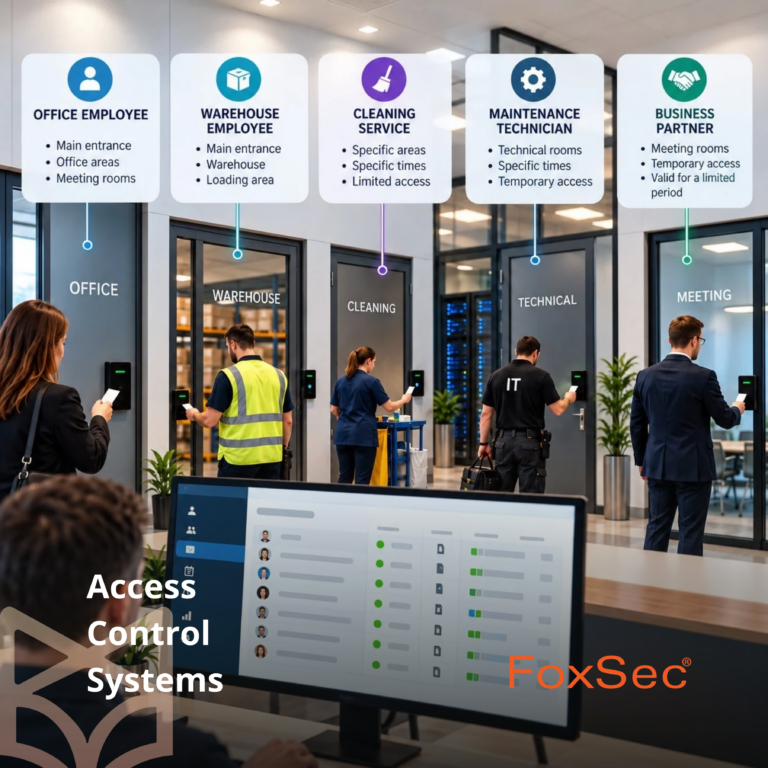
More people enter company premises than just those who work there every day. In addition to employees, cleaning staff, maintenance technicians, IT specialists, and other business partners may need access. Each has different responsibilities, which means they should not all have the same access rights.
Effective employee access management helps businesses ensure that people can enter only the areas they need, and only when access is required for their work.
Not every employee needs access to every area
One of the most common challenges in managing access rights is granting permissions that are too broad. For convenience, employees may be given access to more areas than their daily responsibilities actually require.
In practice, different roles have different access needs.
For example, an office employee may need access to the main entrance and office areas, but not to server rooms or technical facilities. A warehouse employee needs access to the warehouse but may not need to enter administrative offices.
A good principle is to give each person only the access permissions necessary to perform their job.
FoxSec access control systems allow different access rights to be assigned to individual users and user groups. Permissions can be organized according to job roles, departments, or specific responsibilities.
For businesses, this means greater control, easier administration, and a reduced risk of people entering areas they do not need to access for work.
How to manage access for temporary employees and business partners
Not everyone who enters company premises works there every day.
A cleaning service provider may visit the office in the evening, a maintenance technician may arrive at an agreed time, and an IT service provider may need access only when equipment requires maintenance or upgrades.
In these situations, access permissions should reflect each person’s responsibilities and schedule.
For example, a maintenance technician can be granted access to specific rooms during designated hours. When the business relationship ends, their access permissions can be removed through the central management system.
Similarly, cleaning staff can be granted access only to the areas they are responsible for cleaning and during the hours when their services are scheduled.
This approach helps prevent temporary access permissions from remaining active after the work or business relationship has ended.
Centralized management provides better visibility
As the number of employees, rooms, and business partners grows, managing access permissions becomes increasingly complex.
When permissions are managed through different systems or changes depend on several people, it becomes difficult to maintain a clear overview.
FoxSec WEB provides a centralized, web-based environment for managing access control systems. Administrators can manage users, user groups, and access permissions, as well as view system event information.
For example, when an employee changes roles, their access rights can be adjusted to match their new responsibilities. If the company expands into additional premises or reorganizes its departments, access permissions can be updated accordingly.
Centralized management helps keep permissions up to date, reduces manual administrative work, and provides a clear overview of who has been granted access.
Why is access event history important?
An access control system does more than control the opening and closing of doors. Its event history also allows authorized personnel to review recorded access activities when necessary.
For example, if a question arises about whether an access card was used at a particular door or whether an access attempt was authorized, the event history can help clarify what happened.
However, it is important to understand that a recorded access event does not necessarily prove that a person was physically present in a particular room. It records an activity registered by the system.
Because access records may contain personal data, their processing must comply with applicable data protection requirements. Companies need to establish a clear purpose for collecting this information, define who can access it, and determine how long it will be retained. Employees must also be appropriately informed about how their data is processed.
When should access permissions be reviewed?
Managing access permissions is not a one-time task. Business operations change, and access rights need to change accordingly.
Permissions should be reviewed whenever:
- A new employee or business partner joins the organization.
- An employee changes roles or departments.
- An employee leaves the company.
- A service provider’s contract or business relationship ends.
- The company starts using new premises or changes its existing operations.
Regular access reviews are also recommended to ensure that all active permissions remain justified.
This helps identify access rights that are no longer needed and keeps the system aligned with the company’s actual operational requirements.
Access control is part of a comprehensive security strategy
A well-managed access control system helps reduce security risks, but its value goes beyond security alone.
When access permissions are clearly defined and easy to manage, less time is spent on everyday administration. New employees can receive the permissions they need, while existing permissions can be quickly adjusted as responsibilities change.
One of the advantages of FoxSec solutions is the ability to integrate access control with other security systems, including intrusion alarm systems. This allows companies to build a comprehensive security solution tailored to their specific requirements.
The result is better visibility, simpler administration, and greater control over who is authorized to enter company premises.
Are your company’s access permissions up to date?
If your organization has many employees, multiple entrances, or works with different service providers, it is important to ensure that access permissions are clearly defined and easy to manage.
FoxSec access control systems help businesses manage employee and business partner access while providing greater control over access to their premises.
Want to make access management simpler and more secure for your business?
Contact our team, and we will help you find the right solution for your company’s needs.